

Bermuda_Tetrahedron
Dabbler
- Joined
- Aug 10, 2022
- Messages
- 13
Hi,
TL;DR flashing worked, but not sure what happend
this is the first card i flashed and i'm not sure what or why things happened, so maybe someone has some insight...
fallowed this guide https://lazymocha.com/blog/2020/06/05/cross-flash-ibm-servraid-m5110-and-h1110-to-it-hba-mode/
put the card in a pc, booted, noticed that there was no IBM/LSI related boot sceen where it shows you the card and press ctrl+c etc
booted to freedos
megarec -adplist, did list the card
sas2flsh -list, did not work in freedos (Error: Failed to initialize PAL. Exiting program)
megarec -readsbr 0 m5110.sbr, created a 512byte file
megarec -m0flash 0 2208_16.rom, did not work at first
then i tried some things without success
booted to uefi
sas2flash -list, worked but said something about firmware not exactly sure anymore what it was, but it had a cmd-promt
sas2flash -o -f 20.00.02.00_07_it.fw -b bios_07.39.00.00.rom, did not work
what eventually worked was, while in uefi
sas2flash -list, where it said the thing about firmware, i entered "20.00.02.00_07_it.fw" this started flashing something
from that point i was able to fallow the guide from beginning (skipped megarec -readsbr 0 m5110.sbr)
sas2flsh -list, in freedos did still not work
the card bios screen started to show up while booting after the step megarec -m0flash 0 2208_16.rom in freedos (or maybe it was after i entered "20.00.02.00_07_it.fw" in uefi where sas2flash -list would complain about something firmware)
and then continuing the guide, every command worked
since sas2flsh -list in freedos didn't work i didn't have a sasadd, in uefi all i got as sasadd was zeros, so for sas2flash -o -sasadd 5006xxxxxxxxxxxx, i used random digits
ctrl+c didn't work have to check this again
some uefi sas2flsh -list results after flashing
Controller : SAS2308_2(D1)
NVDATA Version : 14.01.00.07
Firmware Product ID : 0x2214 (IT)
Firmware Version : 20.00.02.00
NVDATA Product ID : IBM N2125 HBA
BIOS Version : 07.39.00.00
UEFI BSD Version : 07.27.04.00
bios boot screen: video screenshot -_-
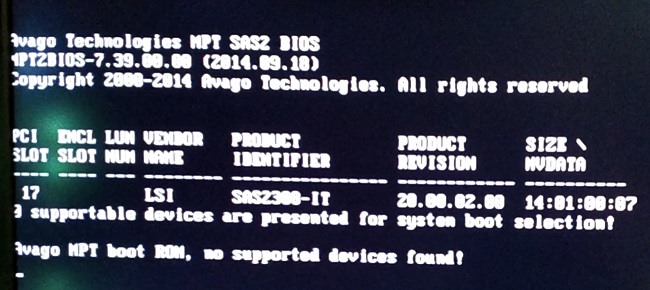
so yeah not sure what happened, why was there no bios boot screen first? was the firmware on this card messed up? etc
thanks for reading
TL;DR flashing worked, but not sure what happend
this is the first card i flashed and i'm not sure what or why things happened, so maybe someone has some insight...
fallowed this guide https://lazymocha.com/blog/2020/06/05/cross-flash-ibm-servraid-m5110-and-h1110-to-it-hba-mode/
put the card in a pc, booted, noticed that there was no IBM/LSI related boot sceen where it shows you the card and press ctrl+c etc
booted to freedos
megarec -adplist, did list the card
sas2flsh -list, did not work in freedos (Error: Failed to initialize PAL. Exiting program)
megarec -readsbr 0 m5110.sbr, created a 512byte file
megarec -m0flash 0 2208_16.rom, did not work at first
then i tried some things without success
booted to uefi
sas2flash -list, worked but said something about firmware not exactly sure anymore what it was, but it had a cmd-promt
sas2flash -o -f 20.00.02.00_07_it.fw -b bios_07.39.00.00.rom, did not work
what eventually worked was, while in uefi
sas2flash -list, where it said the thing about firmware, i entered "20.00.02.00_07_it.fw" this started flashing something
from that point i was able to fallow the guide from beginning (skipped megarec -readsbr 0 m5110.sbr)
sas2flsh -list, in freedos did still not work
the card bios screen started to show up while booting after the step megarec -m0flash 0 2208_16.rom in freedos (or maybe it was after i entered "20.00.02.00_07_it.fw" in uefi where sas2flash -list would complain about something firmware)
and then continuing the guide, every command worked
since sas2flsh -list in freedos didn't work i didn't have a sasadd, in uefi all i got as sasadd was zeros, so for sas2flash -o -sasadd 5006xxxxxxxxxxxx, i used random digits
ctrl+c didn't work have to check this again
some uefi sas2flsh -list results after flashing
Controller : SAS2308_2(D1)
NVDATA Version : 14.01.00.07
Firmware Product ID : 0x2214 (IT)
Firmware Version : 20.00.02.00
NVDATA Product ID : IBM N2125 HBA
BIOS Version : 07.39.00.00
UEFI BSD Version : 07.27.04.00
bios boot screen: video screenshot -_-
so yeah not sure what happened, why was there no bios boot screen first? was the firmware on this card messed up? etc
thanks for reading


